I'm trying to tie up loose ends here. Of course, I have a page or two left to build as a freelance designer for HSC Sower and of course Maggie takes her sweet ass time getting to the office to tell me what to do. Oh well, I'm okay with that. Gives me time to write this, read everyone else's entries and eat a sandwich. I'm ready to work now, Maggie, get your ass in the office!
You will be glad to know that I am quietly observing the dynamic between people left in the office. I'll use code just in case they read all of our blogs but don't tell us (I'm sure they have no clue but using code names should be more fun). Dwight seems to tone down the weird-ass factor when he's talking to... hmm, what name should I use... ah, Rashita. As soon as Phyllis gets in, the office will be more awkward.
I'm really tired of being in the office without the usual suspects. The office in the summer already has an empty feeling regardless, but since I've been stuck here for the past few days without any real attachment to anyone present it has been doubly lame.
On another note, I really love reading everyone's blog. This project seems to be going really well. I have yet to make my trip to St. Louis and share my interning experiences but as soon as that ball gets rolling I'll be in business. Social networking is a really nice thing to use. I'm glad I'm growing up in the generation that I am. If not, I'd be writing eloquent letters to all of you. Now I don't have to ha!
Uhh... it's windy here in Norman. Oh! Someone - don't let me forget my allergy meds. If I go up to Missouri without them I'm not going to see anything because I'll be sneezing the whole time.
Oh yeah, I saw Baby Mama last night. "BITCH, I DON'T KNOW YOUR LIFE."
WARNING: NERD STUFF BELOW I know that a vast majority of you won't care about anything I'm about to say. Bear with me, I don't get to share this stuff with a lot of people so it has to have some type of outlet.
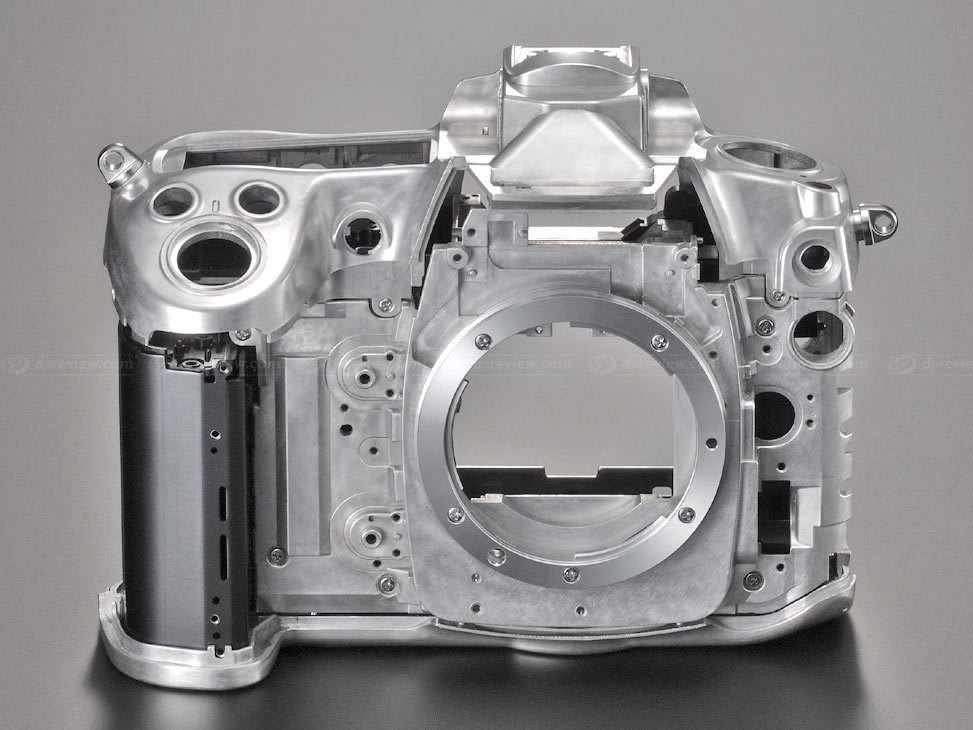
So, last night's shooting alongside Adrian and Quach allowed me to notice a few more handling characteristics of the camera. First off, the camera is an all magnesium body, much like my old D200, but this body feels more solid. The body along with the battery pack feel like one piece of metal unlike my D200 which felt very much like two separate pieces of electronics screwed together at the bottom.
Here is the D300 magnesium body shell. Photo from dpreview.com.
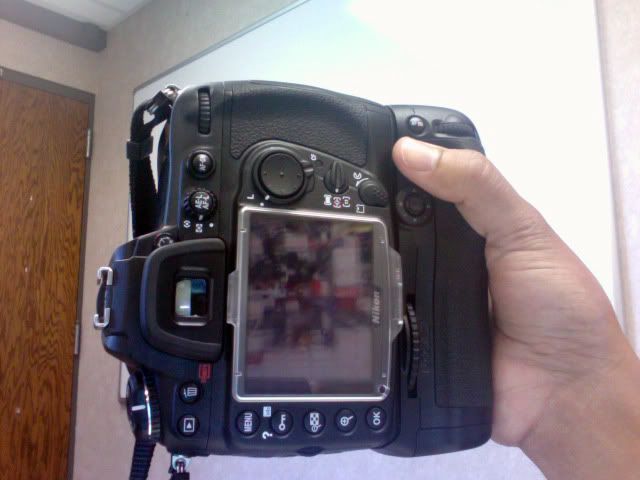
The MB-D10 vertical grip battery pack. Photo from dpreview.com. This pack allows for three battery options: original battery taken by the camera (shown on the left), a battery used in either the D2X or D3 (shown on the right) or a pack with eight AA batteries.
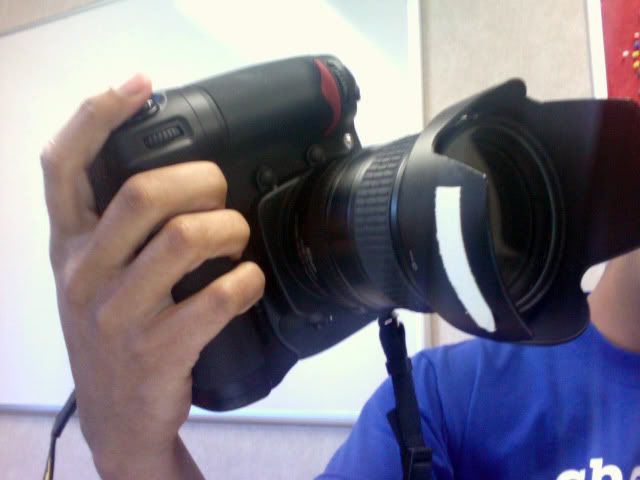
The MB-D10 on the D300 body. This battery pack is an exceptional piece of equipment. It is miles ahead of the D200 battery pack. It is made of magnesium like the camera body, whereas the D200 battery pack is made of a very obvious and frumpy plastic. The MB-D10 is specifically shaped to fit one's hand perfectly. I really does feel like butter. I was extremely impressed with the vertical grip upon first handling and still am right now.
The battery pack also opens the D300 to an 8 frams per second burst.
With makes shooting sports or performances a little easier because I have that peace of mind that I can shoot a reliable burst without missing too much in between. This is not an excuse to be trigger happy, however.
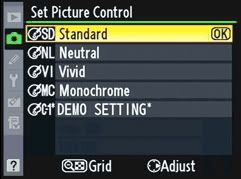
New with the D300: Picture Control Functions Picture Control is Nikon's new color formatting interface. Picture Control allows the user to customize their shooting parameters according to how the user would like to shoot the scene as far as color and contrast is concerned. It comes in five functions: Neutral, Standard, Vivid, Monochrome and Custom. The amazing part is that each can be fine tuned by the user to give more or less saturation or contrast according to how the user wants to set them.
Here is the Picture Control menu screen. Easy.
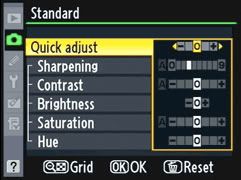
I am able to pick a picture setting and adjust further from there. For instance, here I picked Standard, but now I can adjust individual settings to better suit my needs. Push the arrow left or right on "Quick adjust" and I am able to set the camera to be more saturated or sharpen with three seconds of adjustment time.
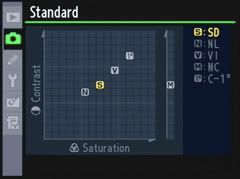
Ability to customize gets crazy from here. In this screen, I am able to use a curve graph and set adjustments much like I would during post-editing in Photoshop. Damn!
What does that all mean while shooting? Well, here are a few examples...
I set up this bottle of Vault energy drink in the office and shot various pictures with the D300 set on the table and 50mm set at f/2.8. From here, I took a series of shots, each one adjusting the picture control to -3, 0 and +3 on Neutral, Standard and Vivid. Here, you are able to see just how much contrast and saturation the camera is able to do by itself:
I cropped the Neutral -3 imaged with the Vivid +3 image to show how much the green changed:
This is a crop of the same area of the bottle in each picture. Neutral -3 is on top while Vivid +3 is on bottom. Pretty big difference considering this is the same part of the bottle and the camera was not changed in any other way other than Picture Controls.
What Does This All Mean? Since the D300 has a "My Menu" function in the menu, I can put whatever I want into one screen for me to adjust. So, for instance, if I am shooting a portrait or a scene with a lot of faces, I can very quickly adjust the camera from shotting really vivid colors to shooting more natural tones so as not to make everyone's face look orange (which I've done many times beings stuck in one picture mode). Now I can comfortably switch saturation and contrast settings without missing the action or effing up the shot, which means less editing on the back end which means faster work flow. I love that thought.
Live View
Live view allows me to view what the sensor sees from the back LCD, much like a point-and-shoot camera. This is new to modern DSLRs. The D300 has two modes of Live View - Hand held mode and tripod mode. For me, tripod mode is most interesting because I can auto focus while in Live View mode, something that Canons cannot do (usually to auto focus, the camera has to close the mirror, auto focus, then bring the mirror back up and open the shutter door to go back into Live View. With Nikon's tripod mode, there's none of that time-wasting stupidness).
Will I use this? Probably not on a regular basis. The cool thing about tripod mode Live View is that I can zoom in on the image and fine tune the focus manually. So, if I'm shooting macro and really need a spot-on focus to achieve what I want, I can do that by zooming to 100% and adjust accordingly instead of shooting a frame and looking at the image review.
Whew, that was a lot. More to come.
P.S. I sat in the office and wrote all this up because I am so bored. There is really no one here to hang out with and I finished all my work hours ago. Everyone is working their internships already and I still have about a week of waiting around. This week sucks.
Most of this post has camera technobabble that may or may not make sense. I'm doing the best I can to explain what I am experiencing with my new camera and if there is anything that doesn't really make sense, let me know and I'll try to be more clear on later posts.
Arrival
After anticipating the arrival of my new D300 all weekend, it finally came in via UPS Ground on Monday. It was really like Christmas morning for me, but there was no one else around to really be excited with. My dad was in the back weed wacking and my mom was at work. Tough.
The D300 box. Woot!
The camera body, nicely packaged in clear plastic.
Oh Shoot! For $1700 it sure does look small in this photo, doesn't it? It's more of a handful than this makes it out to be.
After the initial shock, I settled down... literally. I'm so lazy, I didn't even attempt to go shoot with it since that day outdoor Lawton was about 98 degrees. Sorry camera, we'll have to wait. In the meantime, I watched four movies: For Love or Money (starring Michael J. Fox), The Queen, Everything is Illuminated (Warner Independent film, you should really check it out) and Awake (starring Hayden Christiansen and Jessica Alba... it sucked, don't watch it).
Tuesday I traveled back to Norman for some work-related activities. We got proofs back for Sooner and they ended up being more of a bitch than anyone anticipated. Too long of a story for this entry. Maybe some other time. Anyway, after my day of work I felt like I finally had time and energy to go out and shoot a little bit. Having it for a couple of days without doing anything legit with it made me feel a bit useless. Time to make up for that.
So, where can I go in Norman to see what this thing can do?... wasn't too sure, so I just went to the Duck Pond. Pretty generic - the usual foliage and wildlife shots, but it seemed like a good place to at least experiment with the acclaimed color saturation of the D300.
Colors
I read everything I could and looked at plenty of shots from other people's D300, but having one in your hand really makes a difference. Boy was I surprised. THE COLORS ON THE D300 ARE ABSOLUTELY RIDICULOUS. This camera pops everything. I NEVER see colors like this until I bump the shit out of it on Photoshop. This is awesome.
All of the following photos are straight out of the camera.
The water tower on Lindsey St. The blue sky was not this blue with the naked eye. Nikon D300, 38mm, 1/2000 at F/4.2, ISO200, Picture Control VIVID +3.
Greens and blues are particularly striking. Nikon D300, 42mm, 1/400 at F/4.5, ISO200, Picture Control VIVID +3.
Contrast is well controlled alongside the amazing color saturation. Nikon D300, 200mm, 1/160 at F/5.6, ISO200, Picture Control VIVID +3.
The sun at low horizon made for amazing orange tint on the trees and leaves. At sunset is when the camera's colors really dance. Nikon D300, 18mm, 1/640 at F/3.5, ISO200, Picture Control VIVID +3.
ISO Noise
The D300 is said to have the best ISO performance of any prosumer DSLR. I can safely say that I agree with that statement. While out at the Duck Pond, I experimented at ISOs 200, 400, 1600, 3200 and H1.0 (equivalent to ISO6400). I was comfortable with the noise levels at 800 and 1600 but also really impressed at the noise levels at 3200. I didn't expect it to be as clear as it was. It helped that I was outside and shooting subjects with bright colors. I experimented with different conditions indoors and with people's faces later in the night and was less than impressed with the noise at 3200. Might just me being very picky.
Anyway, here is an example at ISO3200. Again, all photos are only cropped and are not level edited.
I know, this is a small photo, but can you see any visible annoying noise?
Take a closer look. here is a 100% crop
Amazing! I wouldn't dream of running a D200 photo at ISO3200. Colors still look good and the noise is very manageable.
Needless to say, I have much more shooting to do with the D300 to really put it through it's ropes. This was only an hour's worth of shooting, so I have much more to show. Hopefully the next few days with prove as fruitful as my hour at the Duck Pond.
You may have noticed I get a real kick out of the technobabble. Hopefully it made sense.